One controlled product family
Use a defined set of options and representative examples. Identify who maintains those choices and what happens when an option becomes unavailable.
Visual product configuration
A 2D product configurator lets customers explore text, colors and supported options before requesting a quote. ALCA builds focused web experiences that preserve those choices for your team, with a clear boundary between an illustrative preview and a product approved for production.
Leer en español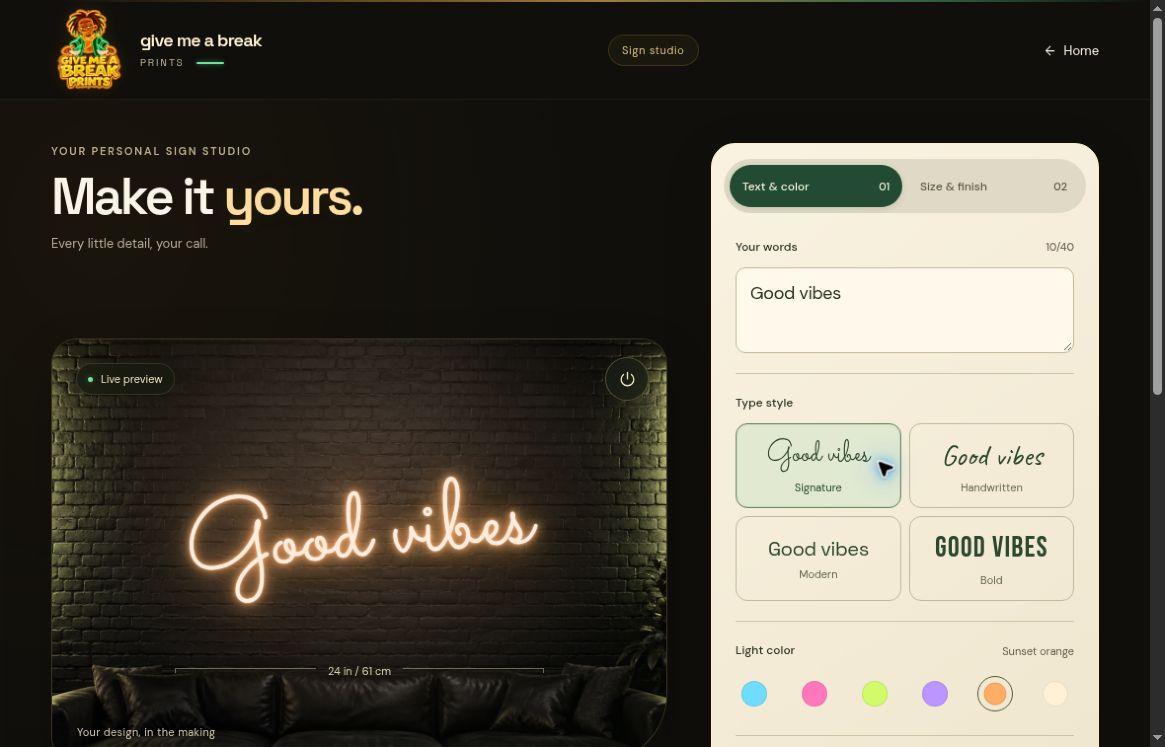
A customer sends a screenshot, changes the wording in a message and picks a different finish over the phone. Sales has an idea of what they want, but no agreed configuration. A configurator can collect a consistent starting point for signs, printed products or other visual customizations. Its job is to clarify the request; it does not replace a production specialist’s judgment.
This is an example scope for a custom build. The exact steps depend on your product rules and how your team quotes work.
Start with one product family. Agree the permitted text, sizes, materials, colors and combinations. Distinguish physical dimensions from preview size.
Let customers explore supported options and see what changed. Explain what the screen represents and which details require confirmation.
Save a stable reference and the chosen option values, with a version of the product rules. A screenshot alone is not the specification.
Send the configuration into the agreed request process. Staff confirm feasibility, price and timing. Later changes create a new revision for review.
Prove one complete request flow before expanding the catalog. These are scope decisions to agree during discovery, not features already delivered for every project.
Use a defined set of options and representative examples. Identify who maintains those choices and what happens when an option becomes unavailable.
Keep the design reference, text and selected options together. Agree whether the customer can download a summary or reopen the design, and how long it remains available.
Show when a request still needs confirmation. Avoid presenting a preview as a production file, an accepted order or a guaranteed delivery date.
Choose a quote request or an existing sales handoff first. Automated pricing, payments, CRM writes and manufacturing exports each need their own rules, access and acceptance checks.
Use them when requests are infrequent, every job needs a consultation or product rules are still changing. Better examples and required fields may solve the problem.
An existing commerce option or plugin may already support your catalog. Try real combinations, mobile use, saved selections and the staff handoff before commissioning custom software.
Custom work becomes worth evaluating when a necessary preview, compatibility rule or specification handoff is missing. Budget for catalog upkeep, browser testing and support as well as the initial build.
Save, reopen and export representative configurations. Confirm that text, options and revision match. Retired choices should be explained rather than silently substituted.
Test unsupported combinations, long text and missing fields. If prices are included, check them against approved examples and explain exclusions; do not infer a total from the image.
Test small screens, keyboard access, readable labels and changing options without losing work. The summary must remain useful when the image cannot be seen.
Check repeat submissions, failed delivery and revisions after review. Give staff a reference to investigate and agree who maintains the catalog and resolves exceptions.
Evidence · Give Me a Break Prints
ALCA’s Give Me a Break Prints project demonstrates a text sign designer with style, color and illustrative size choices. The documented design experience includes saving choices and a link to reopen them. The public site also presents preparation of a quote request.
This evidence supports visual configuration and request preparation. It does not establish quote delivery, production automation, payment processing or measured sales results. Final dimensions, color, price and production details require confirmation.
Not by default. A preview helps someone explore a design. A production proof needs its own dimensions, artwork revision and approval process. Screen color and visual scale should not be presented as guarantees of the finished item.
Only through an explicitly defined process. Saving a design records choices. Requesting a quote asks the team to review them. Pricing approval, order acceptance and payment remain separate steps unless they are deliberately included and tested.
Agree ownership, licensing, access and handover in the project contract. Fonts, assets and third-party components may have separate terms. Define the configuration export and documentation your team needs before implementation.
We can assess a specific handoff to your quoting, CRM or operational system. Feasibility depends on supported access and agreed data rules. Keep visual choices, price calculation and production approval separate so each system has a clear responsibility.
Describe one product family, the choices customers make and what your team needs to review. We can assess whether a form, existing configurator or focused custom build fits the gap.
Start Your Project